Woodman Docker subscription
Subscription payment
Docker is distributed by subscription — from 200 ₽ a month, about the price of a cup of coffee. But this is not a fee for the program, it is support for the project, so everyone picks the amount and the term themselves: the subscription is what lets you download Docker and get updates. When it runs out, most of the features stay available. The list of features that require a subscription can be found on this page.
Enter email or Telegram ID
You can get your Telegram ID from the bot @woodman_panel_bot with the /id command.
Plans
1 month
from 200 ₽
3 months
from 600 ₽
6 months
from 1000 ₽
9 months
from 1200 ₽
1 year
from 1500 ₽
3 years
from 3000 ₽
Forever
from 7500 ₽
Current Docker version:WP 3.10.13 from
Minimum requirements:CorelDRAW 2018, Windows 7, basic CorelDRAW skills
Recommended requirements:CorelDRAW 2020+, Windows 10+, confident CorelDRAW user
Installation instructions:Text Video: YouTube VK Boosty
Full list of functions:Docker functionality + video instructions
Support Derevyashkin's project and get an exclusive macro panel!
Choose any subscription:
- On the website: Subscription payment
- Telegram: https://t.me/woodman_panel_bot
- Boosty: https://boosty.to/wrwoodman/
- Patreon: https://www.patreon.com/mrWoodman
Also join the communities:
- YouTube: https://www.youtube.com/c/mrwoodman
- VK: https://vk.com/macros_for_lasercut
- After subscribing, you will get access to a private Telegram chat.
What is new in Woodman Panel
WP 3.10.13
Recovering Corrupted Files.
- ⚠
Switching to a new version of the keys.
Users won't notice this, but security will be slightly more reliable - ⚠Switch to a new system for collecting statistics.
- +
Repairing corrupted files and opening new versions.
There are now two buttons: one repairs corrupted Corel files, and the other is a "super" button that opens files of any version in an older version of Corel. - +
The option to select any color has been added
In addition to the fixed set, you can now use the drop-down lists to select any color (Alt) or pick a color from an object (Shift) - +
Customizable export before sending to the machine
Two checkboxes have appeared at the very bottom of the machine job settings. “Export”—after each successful submission to the machine, the selected item is automatically saved to a file: the folder and format are taken from the panel’s general settings (share folder and export format), file name — date, time, and document name, for example, 260919_001530_file. “Folder by Name” — place files in a separate folder with the document’s name inside the exchange folder; if such a folder does not exist, it is created. When launched with Alt, the task is not submitted, so the file is not saved. - ✎The linear font has been fixed. It now follows the curve again.
Additional CorelDRAW macros from other authors:
Docker changelog
WP 3.10.12
Machine Control.
- +
Move by Object Size +Ctrl
Ctrl+click on the machine’s movement arrows moves the head exactly by the width or height of the selected object on the page, rather than by the usual increment—this is convenient for placing identical parts right up against each other. The same works in the X/Y coordinate fields: clicking a field while holding Ctrl inserts the selected object’s dimensions as a ready-made offset (hold Shift for the other side of the object, and Alt to make it a negative value). - +
Coordinate Memory
Five button-cells next to the X/Y fields save the desired machine tool points. Clicking inserts the saved coordinates into the fields, Shift+click saves the current values in the fields, Ctrl+click inserts the values and immediately moves the machine to that point, and Alt+click assigns a name to the button—it appears in the tooltip above the button along with the coordinates.
WP 3.10.11
Machine Tool Job Builder.
- ✎
The engraving algorithm for raster objects has been changed
If the edges of an image have been cropped at the nodes using the "Shape" tool, only the visible part is now engraved. Previously, in such cases, the entire rectangle of the image was engraved regardless, without taking the cropping into account. - +
PowerClip is now supported
If an object or image is inserted into a shape using PowerClip, you no longer need to manually select the inside of the container—cutting, engraving, and bitmap images will automatically be cropped to the portion visible through the container. The container frame itself is not included in the cut. - +
Color settings are saved for each file.
The speed, power, and other parameters for each color are now saved directly in the drawing file—so when you reopen it, even on a different computer, you won’t have to remember what settings were used for cutting. You can transfer this set to another file using a text object: to create and read it, right-click “Scan” in the CNC section. - +A feature has been added to remove SVG metadata and handle single-object groups.
- ✎
The algorithm for saving and restoring object positions has been modified
The btns:btn_layers_save and btns:positions_save buttons have been rewritten. btns:grp_smart now supports automatic grouping by frame and by shape.
WP 3.10.10
Complete reference guide to Docker functions.
- +
Detailed help on functions
Middle-clicking a button opens a brief description of that button and a YouTube video (if available). Pressing Alt and middle-clicking on a button opens a more comprehensive help page on the website—with images, all button functions, and the full video. Any other modifier key, such as Shift or Ctrl, can be used instead of Alt. - ✎
Minor changes to the installer.
You can now specify multiple custom folders for installing Docker. - +
For those who write their own macros
a file named docker_ai_prompt.md has been added to the archive; you can feed it to the AI to use the code written in Docker - ✎
Minimum rotation button btns:rotate_set_min
Button for rotating to the minimum area or size. Tool tab tool:raspred - ✎
Modification to the btns:btn_cmnborder button
A mode for quickly creating lines has been added. This is useful for trimming uncut areas on plywood. - ✎
Added dual webcam exposure
You can now take a frame consisting of two halves to calibrate the camera "above the machine" if the gantry prevents you from capturing a complete, full frame of the calibration grid.
WP 3.10.05
Interface updates. Website.
- +A section of the user guide covering buttons and functions has been added to the website.
- +
Added extended help via Alt+MdlClick
A standard tooltip appears when you perform a regular middle-click; a window with extended help will open when you middle-click while holding down any of the Ctrl, Shift, or Alt keys - +
Font selection button btns:btn_fontlist_bynum
Selects the desired entries in the font list by their numbers and deselects all others. This is convenient when the set of fonts for the list has already been specified somewhere as a list of numbers—in the task, in correspondence, or in an adjacent text block of the layout. - +
Added a QR code mode with a logo
The logo—whether an object or an image—must be placed on top of or below the text. It is important that its dimensions do not exceed those of the text.
WP 3.10.04
Multilingual support.
- 🗑The number of interface languages has been reduced.
- ✎Style adjustments to the interface.
- +Added a feature to bulk clear all effects in the selected area.
- +22 line fonts have been added. Thanks to Denis.
- ✎The "Milling" tool has been moved to tool:actions
- +
"Timer" checkbox
Displays statistics on the execution time of actions in Docker. - +
"Radius for Router" Generator
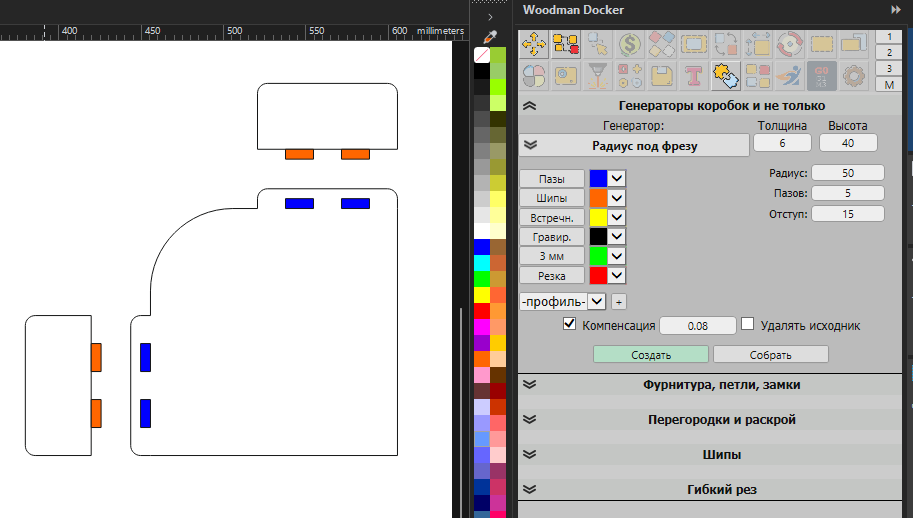 Generates a guide for a hand router to easily round corners to the desired radius
WP 3.10.03
New generators and repairs to old ones.
- +
Added the gbx:gen fill circles.js generator
Arranges circles inside any shape—either in a grid or randomly—with spacing between circles and an offset from the edge. The size is specified not by a field but by a template: draw a circle of the desired diameter and add it to the selection last. If the “two sizes” checkbox is selected, there are two templates, and the diameter of each circle is varied between them—making the layout both denser and more dynamic. The third layout uses maximum circles: the size is dictated by the shape itself; the largest circle that fits is placed inside it, then the next largest in the remaining space, and so on until the template size is reached—coverage reaches up to 90%. - ✎
The `gbx:gen linerullers.js` file has been expanded.
Added "large font" and "linear font" toggles, which allow numbers that are multiples of 5 cm to be displayed larger. Checking the "opposite side" box draws the ruler in the same direction but on the opposite side. - ✎When rotating, the actual dimensions of the shape are taken into account [The Replace, Set Dimensions, and other functions more accurately determine which side is the width and which is the height
- ✎
Searching for wide and narrow areas.
The algorithm has been ported to a mathematical engine. The search is now significantly faster and more accurate. This will help with numbering parts, for example, when coloring by color. - +
gbx:paper dome.js—segmented and flexible.
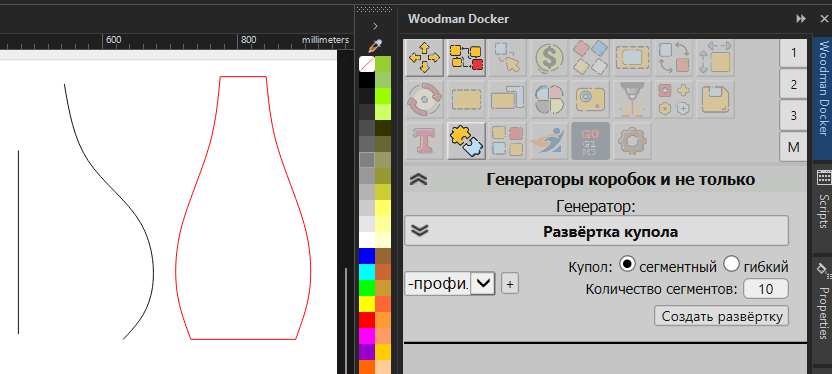 Unfolds the dome into a single wedge. Draw the dome’s profile—half of its cross-section—and a vertical line: this defines the axis of rotation. The height of the unfolded shape is equal to the true length of the profile, not the height of the dome.
WP 3.10.02
Baseline and Resizing.
- +
Added a base point toggle
The document's base point is now set at the bottom of the docker, and all docker tools use it. - ✎
The algorithm for batch resizing has been modified to account for the "rotate" checkbox
A rotated object now scales along its own axes rather than along the bounding rectangle, and scales from the document’s base point: if you place it at the bottom center, the bottom will remain in place while the object scales upward. A standard click uses the rotation angle from Corel itself. When you hold down Ctrl, the angle is calculated based on the geometry—not for each part individually, but relative to the last selected part, which determines where the top of the parts is. Therefore, identical parts arranged in a circle or along a curve are resized strictly in one direction. This same click comes in handy when the rotation angle for the parts has been reset to zero—for example, after importing a DXF file. The entire group changes, and its rotation is determined by the longest contour within it. - ✎
The option to measure an object has been moved from the "Dimension" button to the fields themselves.
Clicking a field while holding down Ctrl inserts the corresponding dimension of the selected object: width into the width field, height into the height field, and curve length into the perimeter field. Hold Shift to enter the height, Alt to enter the width, and Ctrl+Alt to enter the curve length into any field. The Ctrl button is now available for the new rotation mode. - ✎
Move it! Now works with rotation
The new checkbox causes the form to use the part’s own axes rather than the sheet’s axes: offset, dimension, half, butt, and nodes, as well as increments using Alt. The button still specifies the side, but the side is taken from the part itself: for a rotated slot, “top” refers to the top of the slot, not the top of the dimension. The “Butt Joint” option first rotates the part to match the angle of the last selected part, so it aligns with its face rather than at a corner. The hotkeys for joining and halving work with rotation by default; the previous behavior remains available next to them under the same names with the suffix _no_rotate.
WP 3.10.01
The settings are out of sync.
- ✎
Settings for different modules are stored in separate files.
A "settings" folder has been created in the %appdata%/wpanel folder, and large blocks of settings are stored separately within it. This was done to speed up the interface. - ✎Translations from GBX modules have been moved to the general localization.
- +
A button for rotating to optimize area has been added. btns:rotate_set_min
Rotates each selected object so that it takes up the least amount of space. The angle is calculated precisely rather than selected by iterating through a range, so there is no minor misalignment, and this operation is fast even with hundreds of parts. The checkbox next to the button determines what is considered the smallest dimension: with it checked, the program finds the smallest area of the bounding rectangle; without it, the smallest side. The arrows specify how the part will be oriented: sideways—with the long side horizontal; upward—with the long side vertical. Rotations of less than half a degree are not performed at all to prevent already straight parts from shifting. Each object rotates independently; if you need to rotate several as a single unit, group them together.
WP 3.10.00
Interface redesign.
- ⚠If you find any bugs in the test version, please report them in the Telegram chat.
- ⚠
Switched to a new rendering engine.
It now runs on the IE11 engine—rounded corners, shadows, cursor highlights, and neat indentations have been added, and the interface can now be further developed. Exact versions: IE11, ECMAScript 5.1, CSS 2.1 with CSS3 modules. For those writing their own GBX generators, JSON, Object.keys, strict mode, and the array methods forEach, map, and indexOf are now available. If something in the panel has shifted or stopped responding to clicks, please let us know in the chat—these are side effects of the migration.
WP 3.05.59
Box Generator.
- ✎Minor changes to the box generator module. We're testing it.
- +Added automatic placement of cut-off gaps. btns:make_gap_qty
- +Added automatic file numbering when generating STL files
WP 3.05.58
Puzzle generator, sorting, and compression.
- +
The puzzle generator module has been updated.
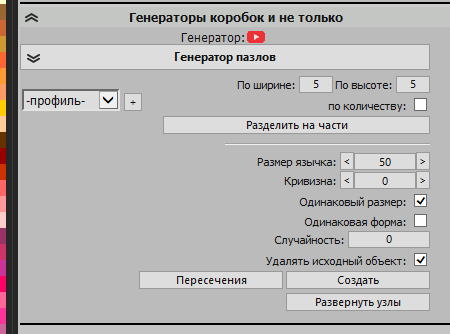 You can now create simple puzzles from a rectangle or from a single-element size in the specified quantity. A protrusion flip feature has been added: enable node editing, select an entire lock—from the node on the cut line to the next node on the line—and click “Flip.” The tab will move to the other side, the ends will remain in place, and the node selection is not reset, so you can click the button repeatedly.
 - ✎
The Align tool and the spacing buttons next to it now work with objects of different sizes; previously, they only worked with objects of the same size.
The "Seal" tool groups objects in a grid: roughly square, or according to the number of items per row if specified. When Shift is held down, the spacing buttons and arrow keys set the exact spacing specified in the fields, rather than double that amount, as was the case before. - ✎
The sorting of objects by location has been rewritten.
Rows and columns are sorted by dimensions rather than by the offset from the first object, so parts of different sizes no longer get mixed up with each other, and reversing the sort order restores the entire order, including the order within each row. Menu items that sort by size can now also account for layout: select an item while holding down a key, and parts of the same size within their group will be arranged in rows, columns (Alt), a zigzag pattern (Shift), or in the opposite direction (Ctrl). At the same time, sorting by height has been fixed: it was previously sorted in the opposite direction relative to width and area.
WP 3.05.57
Direct operation of a CNC milling machine and plasma cutter.
- +Added a complete module for operating CNC milling machines and plasma cutters. Direct GRBL control, G-code transmission.
- ✎The bottom generator has been updated to include holes based on the most recent object.
- +You can view your serial numbers and keys in the "Subscription" section of the website.
- +Added a "frame" button for positioning relative to the camera.
- ✎The dashed line has been fixed; you can now control the size of both the stroke and the gap more precisely.
- +
Added "zigzag" cutting mode.
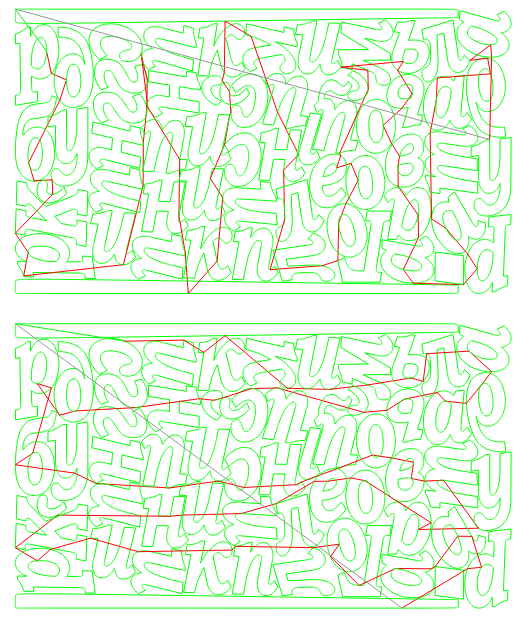 To enable this mode, you must disable coupling and clusters. For horizontal zigzag, set the line count to 100; for vertical zigzag, set it to -100.
 - +Added a "Start Point" checkbox that sets the direction and starting point of the cut for the object.
- +
Added functionality to create cut-ins for laser or plasma cutting.
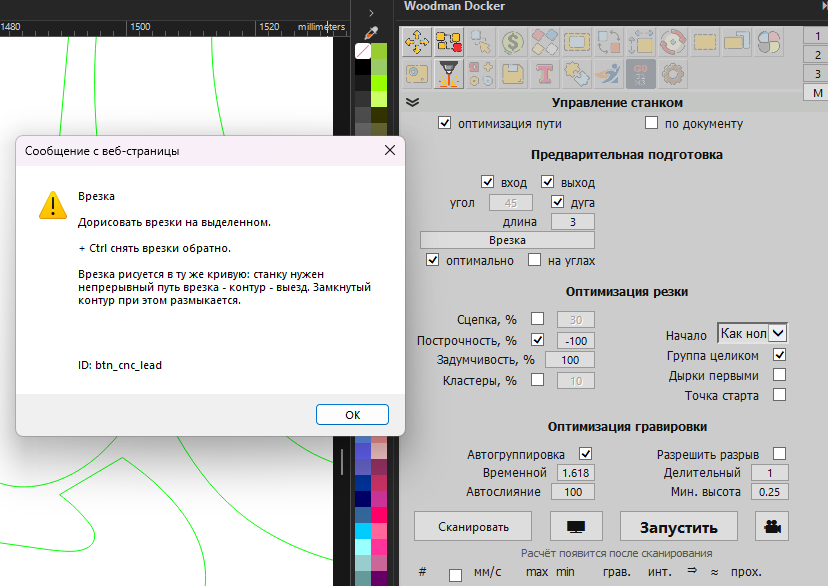 Look for "preparation" in the path optimization settings (via Alt) btns:btn_cnc_lead
WP 3.05.56
Editing Object Operations
- ✎The algorithm for calculating the area of objects in the calculator has been optimized.
- ✎The node calculation algorithm has been optimized.
- ✎
The algorithm for generating cutting tasks has been revised and improved.
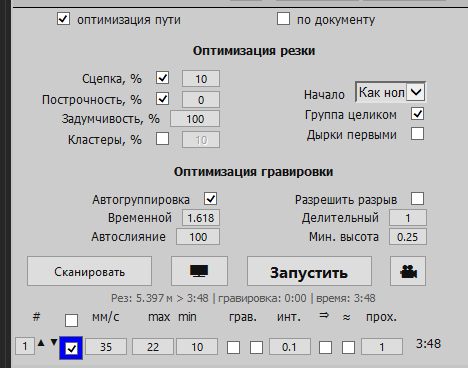
WP 3.05.55
The key validation has been slightly modified
- ✎Update to the subscription verification algorithm.
- +
Button for finding intersections and self-intersections.
Finds points where lines intersect each other or themselves. The found points are marked with red circles—they remain until the next time the program is run and then disappear on their own. In addition to displaying these points, it can place nodes at them, break the path there, and remove loops: cut out the overlapping section and reconnect the ends. Only instances where one line crosses another are considered intersections. End junctions, tangents, and the corners of the path itself do not count. Only the parts being edited are converted to curves; the rest of the layout remains untouched. - +
A feature for quickly selecting a layer by color has been added to the task planner.
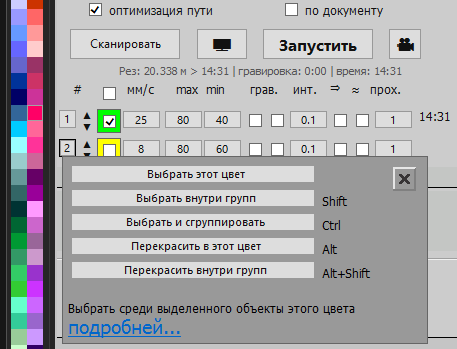
WP 3.05.54
The GBX module engine has been updated
- ✎
The GBX module engine has been updated
These changes are mostly technical in nature and are intended for those who write their own modules. Please read the updatedhelp - ✎Changes to the search for the location of the settings file
- ✎The algorithm for adjusting thickness has been slightly improved
WP 3.05.53
The task builder has been rewritten
- ✎The algorithm for generating a job to be sent to the machine has been updated. New settings have been added.
- ✎The btns:nest_holes algorithm for objects in a layout has been optimized.
- ✎The tag search algorithm for *head-mounted* webcams has been optimized*
- +Added profiles for GBX generators
- +
Added a node straightener.
Removes the "ladder-like" artifacts that remain after raster tracing, as well as node jitter on lines that should be straight. For each node, a line is drawn between the midpoints of the two adjacent segments, and the node is pulled toward it: the direction of this line does not depend on which phase the step is in, which is why it turns out to be “midpoint.” The alignment percentage determines how much to pull—0 moves nothing, 100 places the node entirely on the line; you can click this button several times in a row. The edges of the section are processed separately: you can leave them in place so that the alignment with neighboring objects isn’t affected, align them along with the rest, or place the entire section on a single averaged straight line—in which case, at 100%, it becomes perfectly straight from start to finish. This function applies to selected nodes if more than one is selected; otherwise, it applies to the entire object. Checking the “Smooth” box thins out the nodes using Corel’s built-in tool after straightening. Please note: The straightener does not distinguish between a raster step and a true angle and reduces any break—this is exactly what you need for tracing, but on clean geometry with a small number of nodes, the corners will be rounded.
WP 3.05.52
New features have been added.
- +
A margin generator for canvas printing is now available.
Look for it in the GBX module under "Various Generators." - +Almost all color models have been added to the print preview.
- +Added the option to select a camera profile in the machine control profile
- +Puzzle Generator (Test Version)
- +
Added the "Razukrashka" color generator.
The "Razukrashka" script is a tool for CorelDRAW that automates the coloring of multiple objects without having to manually select a color for each one. The main mode creates a gradient (smooth or using a specified number of colors) between the start and end colors in RGB/CMYK: it either fills multiple selected objects in the order they are arranged, or creates a gradient series of copies of a single object—in both cases, labeling the color values beneath the objects. An additional set of tools works with random colors: save a palette of samples, color using that palette (as a fill or stroke) with the “no repeats” option, or fill with completely random colors without using a palette at all. Separate buttons allow you to further reorder the objects on the layer. Co-authored by Alexey and Andrey ))) - ✎The algorithm for creating a contract for a raster has been changed.
WP 3.05.51
Improvements to the operation of CNC modules.
- ✎The algorithm for navigating around shapes during cutting has been revised
- +Added the ability to send files directly to the milling machine from the module
WP 3.05.50
Mode for moving nodes without changing the length of the lines.
- +
You can now modify the shape by adjusting the vertices without changing the length of the lines.
Ctrl lets you create smoother angles. Shift lets you lock a vertex to prevent it from moving. Alt lets you change the length of the lines if the lock is active. - +GRBL-USB Support
WP 3.05.49
RUIDA controller support.
- +Support for the RUIDA controller is not yet available for sending commands.
- +Support for raster engraving for AWC
- +Reading and Writing AWC and RUIDA Controller Settings
- +USB protocol support for RUIDA
- ✎Changed the calibration for the head-mounted webcam
WP 3.05.48
Selecting the outer contour of objects.
- +
Added the btns:btn_outline_sel button to the "Miscellaneous Actions" tool
Allows you to isolate an object's outer outline for further manipulation. You can also delete the outline or, conversely, delete the inner objects - ✎
Slightly improved the behavior of creating partitions
Now you can draw them independently of the box to create arbitrary structures. - +Automatic repainting of engravings and cuts according to the mode settings.
- +Simulation of the order and timing of cutting and engraving.
- +Moved the cutting and engraving optimization settings to the interface
- +
Two checkboxes, "Trim" and "Connect," have been added for the middle line
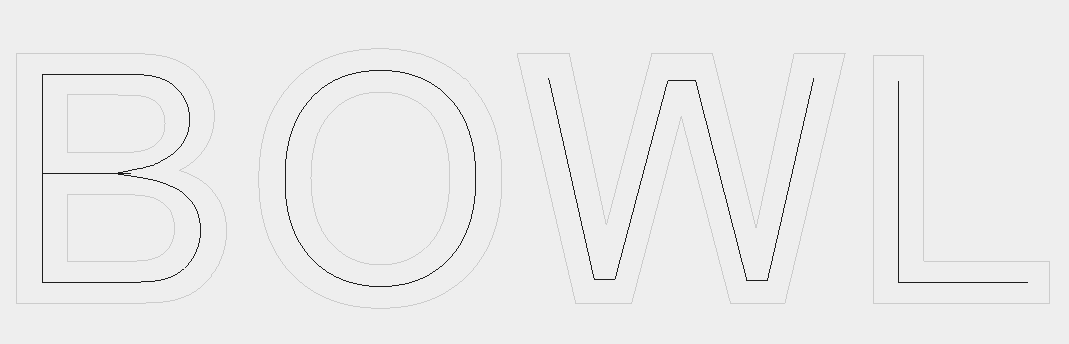 You can trim the ends of lines that touch the edge of an object and connect the trimmed ends withlines
 - +USB protocol support for AWC
WP 3.05.47
The camera module has been thoroughly redesigned.
- +Added first-person view.
- +Added a perimeter marker support mode for correcting complex distortions and material stretching.
- +A machine control module is currently being developed (and is already being tested on Telegram). Sending a job to the laser directly from CorelDraw.
- ✎
Auto-grouping has been optimized
Rewritten using a new mathematical approach. - +
For AWC, I've added support for almost all the settings I could find
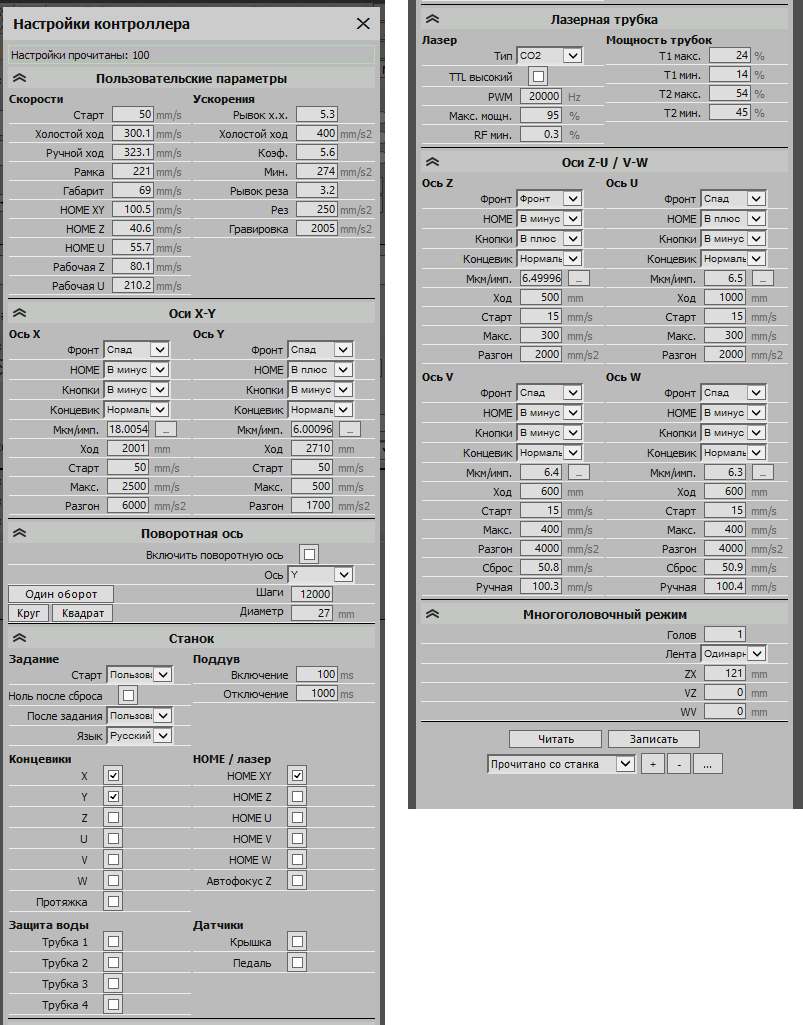 I found and added settings that aren't even available in the stock LaserCAD
 - +
Easy rotation and step calibration
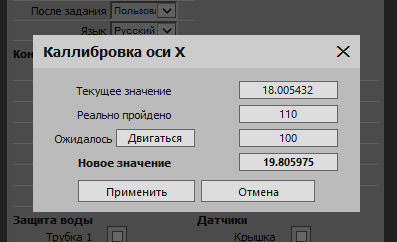 It's easy to calibrate and adjust by moving the machine directly from thesettings
 - +Accurate estimation of task completion times with detailed information by layer.
- +
Adaptive Engraving
Calculates time savings during engraving by reducing idle passes through empty space. This means you no longer have to color objects in different colors to gain speed. Docker will do it for you - +
View and control Origin using the current camera
The compact control window is useful for a head-mounted camera.
WP 3.05.46
The webcam module is working again.
- ✎
The webcam module has been restored.
A profile system for different machines and cameras has been implemented; you can now select a camera from the list and choose the resolution. Standard and advanced camera settings have been added, along with a live preview that does not interfere with image capture. - +Added "head-mounted camera" and "L-mark editing" modes
- +Added support for T-marks for distortions
- +A "Slitting Tool" has been added to the GROSLAZER generators to calculate the number of cuts made by the milling cutter.
- +"Eyelets" have been added to GROSLAZER generators, along with the hole pattern for the eyelets.
WP 3.05.45
Online payment and user verification via a code sent by email or Telegram.
- +Payment on the website. Currently, only via Yoomoney and Russian cards
- +
Secure User Authentication System
Two-factor authentication for downloading updates both on the website and in Docker. - ✎Modified wall detection for Karabox
- ✎
I've optimized Cleptogram a bit
It now compiles faster and can still search for any objects, even those outside of named groups.
WP 3.05.44
Lock tabs in box hardware.
- +
Added tabs on the front or sides of boxes.
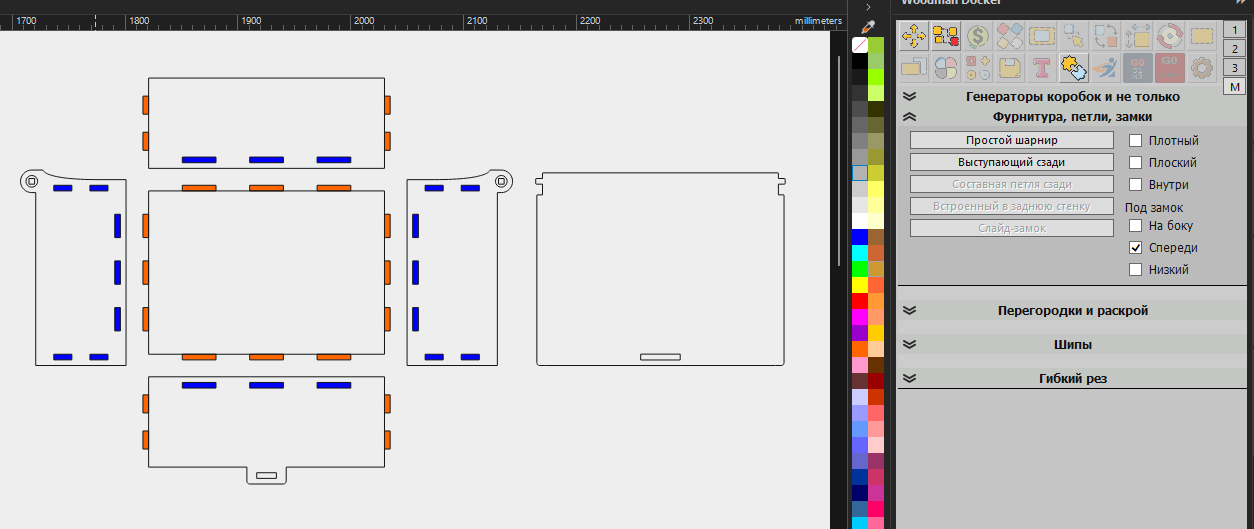 You can now create tabs for the lid on the front or side walls at the same time as you create the hinges.
 - ✎The algorithm for filling an object with a pattern has been improved.
WP 3.05.43
Center-line generator
- +
A major addition to the list of generators. Creates a centerline using letters and simple objects.
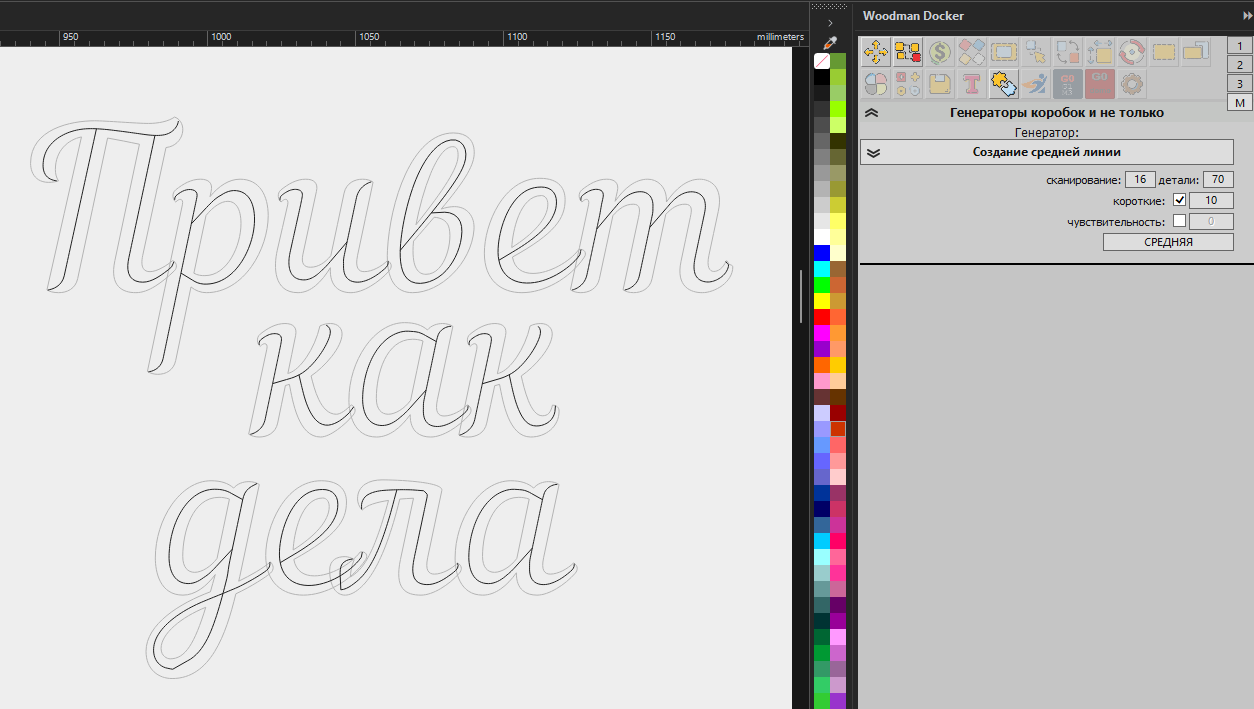 The algorithm finds paired walls and attempts to construct a smooth, elegant line between them.
 - ✎The "place on the horizon" algorithm has been improved; it now takes the angle at the exact click point, not along a segment.
The OCR module is back!!!
- ✎The image text recognition module is working again.
- ⚠
To get OCR working, you need to download thefile, unzip it, and place it in wpanel/bin/
This should result in the following directory structure: wpanel/bin/ocr, containing the x64, x86, and tessdata folders. - ⚠You can find any additional languages on thehttps://github.com/tesseract-ocr/tessdata_bestwebsite
- +Added 4 types of barcodes: ITF14, GS1_128, UPCA, and MICROQR
- +A center-line generator has been added to the various generators in test mode.
WP 3.05.41
The option to select by object type has been moved to the Auto-Grouping tool
- ✎
Moved the type selection buttons to the auto-grouping tool.
It really should have been there a long time ago—the icon matches the selection, and the button group looks compact next to it. - +
Added an algorithm to sort objects by layer based on width/height/area
Sorting by layer does not visually reorder the objects; it only rearranges them within the layer. Also, keep in mind that it sorts from the bottom up.
Template for your own set of macros
- +The Docker archive now includes myhotkeys.gms—a template for your macros. [For those who want to create their own simple macro or assign a Docker function to a hotkey.] The archive contains a template file named myhotkeys.gms, which you need to place in the GMS folder—somewhere like this: c:\Users\DukereD\AppData\Roaming\Corel\CorelDRAW Graphics Suite 2026\Draw\gms. In Corel, press Alt+F11 to open the code editor, where you can add or edit the code.https://mrwoodman.by/files/myhotkeys.gms]
- ✎Fixed the "silent update" bug
The layout algorithm has been slightly revised.
- +
Added the btns:nest_holes button to add objects to a container.
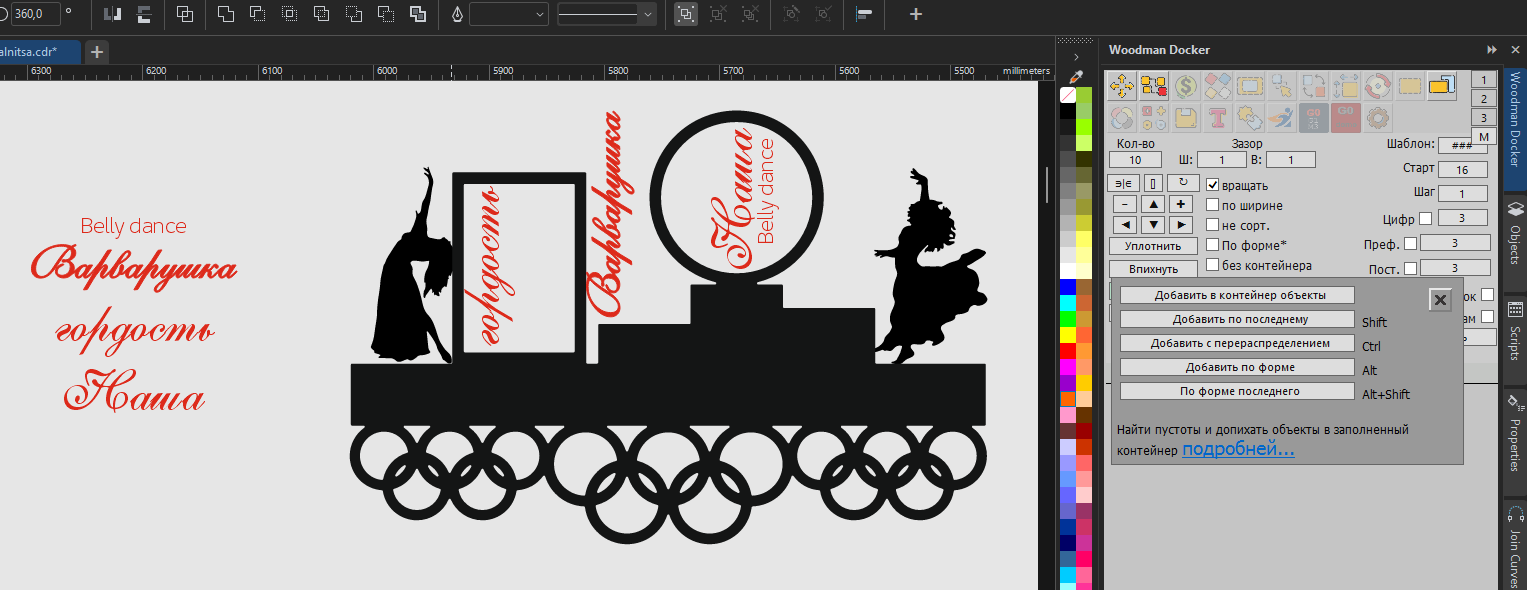 Three modes: Squeeze objects in, add objects to the container and redistribute them, and squeeze objects in while accounting for their shapes. The algorithm is very slow when there are a large number of small objects. hint:nest_holes:0:0
 - ✎We've slightly rewritten the layout algorithm. We're testing it.
Now you can use a template to replace objects.
- +Added the ability to arrange objects according to a template [to do this, create a template with rectangles showing how the objects should be arranged, group them, and select them as a master object]. Next, using the context menu on the “Insert” button, insert the objects onto the current sheet or onto multiple pages at once.{hint_30538_templ_ru.png}]
- +
The template now supports importing by full path.
Text objects can be imported individually, as a single block, or even from the clipboard. In a text block, a single line can contain just paths or tab-separated lines that will replace text objects within the template (creating captions). It can also be a path to a .txt file containing a list of files or simply a path to the folder where the files are located. Files are selected using the following filter: *.jpeg|*.jpg|*.png|*.gif|*.tif|*.tiff|*.cdr|*.eps|*.pdf|*.ai - ✎
Improved the corner rounding algorithm.
It now runs more stably, but most importantly, the object no longer breaks apart or loses pieces. - +
Added a context menu with additional functions for the color buttons in the color scanner.
Now the SHIFT key doesn't interfere with other functions and works with any mouse button within the subgroups. - +
A "Mirror" checkbox has been added to the "Replace with Sample" option.
If this checkbox is selected and an object has been mirrored, it will return to the sample's position. The rotation angles of mirrored objects should now be interpreted correctly.
The "Average" and "Overflow" buttons have appeared on the "Miscellaneous Actions" tab
- +
Added a feature to draw a midline between two simple shapes
You can draw a midline between multiple simple objects. Select the curves in the desired order. - +
Added a feature for quickly creating flow paths
Creates a standard flow path between each selected object or between selected pairs. You can also create a looped flow path. - +
STL Generator
 Under development. Needs testing!!!
 - +
Karabox now assembles both with and without compensation.
Based on the outline color, it determines which parts to glue (spikes) and which to cut out (grooves) in the same way as it does for fills, but it does not compensate for these objects.
New buttons and hotkeys have been added
- +
A "Mirror Along Line/Object" button has been added.
Mirror objects along a line or another object. If the click is not on the line, the system checks which quadrant the click landed in—and the mirroring is performed in that direction. - +
as well as a couple of functions for hotkeys
mirror_by_line—same as mirroring—change_2objects, and circle_3pt - As usual, see hotkeys_readme.txt for the full list of hotkeys.
The algorithm for finding duplicates been rewritten
- ✎
I completely rewrote the duplicate search algorithm from scratch.
It can now search for similar objects that are stacked on top of each other, as well as those located independently anywhere. It can also search for similar objects rotated at any angle. The search algorithm is now faster and more reliable, and it finds duplicates while accounting for slight differences in size and position. - ✎
I called a timeout to check the keys.
Due to Telegram and other websites being blocked for unclear reasons in the Russian Federation - +
New "Circle" button: Circumscribed, inscribed, and by chord.
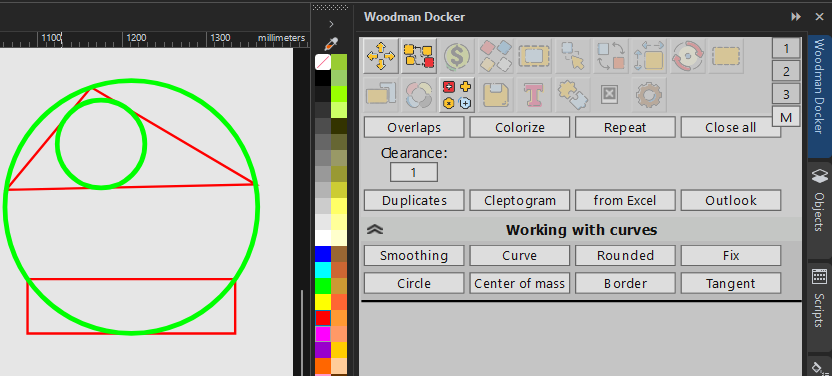 Creates a circumscribed or inscribed circle based on the first 3/4 points of the selected object. You can also create a circle based on the chord length and segment height using the object's dimensions.
WP 3.05.34
The rules of math for smart offsetting have been updated
- +Added a separate offset for the Y-axis.
Now you can specify it as a relative value: *2*5+50*2
 this will create an array of 5 by 2 objects, with an X-step twice the width and a Y-step of +50 added to the height.
if you need to use multiplication for Y, write "**": *2*5**3*2
this will create an array of 5 by 2 objects, with a step size along the X-axis twice as wide as the height and along the Y-axis three times as tall.Absolute values work the same way: 150*3*100*4
creates a 3-by-4 grid with a step of 150 along the X-axis and 100 along the Y-axis- ✎Fixed a bug causing PowerClip to rotate when replaced with a sample.
- ✎
The algorithm for generating serial numbers has been changed again
Sometimes the same serial number was generated for different users, and the subscription verification was incorrect. - ✎A bug in batch file processing has been fixed.
- +During batch import, renames the page, layer, and object based on the filename (excluding the file extension).
- +
Added a feature to draw lines when creating labels.
Solid vertical and horizontal lines are drawn from one edge of the sheet to the other, based on the label dimensions.
WP 3.05.33
Change to the Serial Number Generation Rule
- ⚠Some vehicles were assigned identical serial numbers.
- ⚠For those who had no issues, the serial numbers will remain the same. For those who had a match, they will receive a new serial number.
- ✎I tweaked the smart offset. Now you can type +0 or +* and it will use the exact size of the object.
- ✎Fixed the linear font glitch
- +
A "Delete" checkbox has been added to the "How many?" button in the compositor.
This feature allows you to immediately delete the source objects, leaving only the composited ones. - +
Added the "Delete Structure" modifier for creating cut lines.
When this checkbox is selected, a complete grid is created, including along the edges. If the checkbox is deselected, the original rectangle remains, and the grid is drawn only inside it. - ✎Fixed a bug that occurred when creating objects from an Excel table
- ✎
Fixed a math error in the mini-form fields.
You can now type /2 or *3 directly, and it will apply the mathematical operation to the original value in the current field.
WP 3.05.31
Nearly automatic Docker updates.
- +You can get a link or download the latest version of the file.
- +Check for the latest version.
- 🗑The OCR module has been removed from version 31. It was causing some glitches. I'll look for a solution.
WP 3.05.30
OCR - Text recognition in images.
- Note: For the recognition feature to work, you need to place the "tessdata" folder from the archive into the Docker folder (in wpanel).
- The dictionary file is included separately so as not to increase the size of the distribution package.
- You can find any additional languages on the website
- https://github.com/tesseract-ocr/tessdata_best
WP 3.05.23
Step-by-Step Initial Setup
WP 3.05.21
Added a feature to find the center of mass of objects on the "Miscellaneous Actions" tab
- +The perspective correction button has been moved to the "Miscellaneous Actions" tab in the docker
WP 3.05.20
calculator that matches materials by name and color.
- "I jumped" straight to version 20 because I made a lot of changes to the engine
WP 3.05.15
Moved the foam-editing tool from the toolbar (to various generators)
WP 3.05.14
Materials Calculator. (Subscription required)
WP 3.05.10
Copying effects using a sample.
WP 3.05.09
The new installer has been completely redesigned.
WP 3.05.08
Stud Thickness Adjuster (new algorithm)
WP 3.05.04
Book-style box
- ✎Proportional spreader
WP 3.05.03
Segment box in the Karabox.
WP 3.05.00
The Docker engine has been significantly rewritten